A free tool for converting video files and burning discs
Ultimate Video Converter allows you to input video files and convert them to different video files. It also allows you to edit things such as framerates, bitrates, etc.
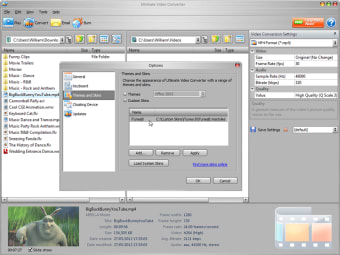
Ultimate Video Converter is a tool where you feed it a certain video file and it converts your file to whatever output file you choose. Despite being an old and run-of-the-mill converter, it is good how you are able to adjust the file settings to actually alter the quality of the video. In essence, it also turns this converter into somewhat of a video editor too. Some of the function icons are redundant, such as how the email button leads to an error because it is trying to prompt email software that no longer exists. Plus, the themes and skins do not apply because many media players do not use them anymore. Alter the settings if you downloaded a video with an NSTC framerate and you need a PAL framerate.
Still useful for specific jobs
Ultimate Video Converter allows you to convert your videos and adjust some of their settings. Its free conversion tools are not so impressive since its range of input and output files is limited and doesn't include. However, the ability to affect settings while converting is going to appeal to some users who do not want to spend hours rendering their videos through a fully-featured video editor. It could be useful for video hobbyists, programmers create video-related apps, people testing A/V equipment, and people who are trying to fill smaller hard drives with video content.
Pros
A fairly intuitive (self-explanatory) user interface
A very small and easily installed program
Burn videos and music to CDs and DVDs
Uses duel core when converting
Cons
Some of the function icons are redundant
The grey colour scheme is functional but ugly
Duel core and multiple core rendering speed differences are negligible
Ultimate Video Converter lets you convert your favorite videos, movies and music to the format of your choice.
Ultimate Video Converter converts content to a range of formats and to suit a range of popular devices including iPod, iPhone, iPad, Android, Sony PSP and MP3. All popular video formats are supported such as 3GP, AVI, WMV, MP4, MOV both in Standard and HD resolutions. Convert videos and movies in less than 3 seconds with the amazing 'Super Fast' conversion options! In addition to its preset options for 'one-step' conversion, Ultimate Video Converter enables advanced customization of video and audio settings - providing ultimate control over the precision and quality of output. Custom presets can also be saved for future use.
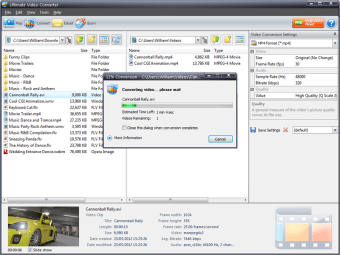
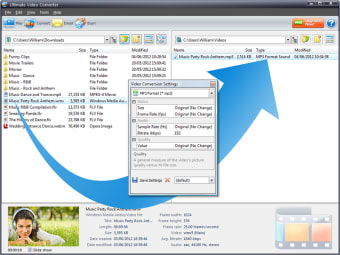
Ultimate Video Converter enables fast and easy conversion of videos and management of your video collection on disk. Converting videos simply by dragging and dropping them within a Windows Explorer style interface becomes a reality with Ultimate Video Converter! Select your preferred conversion format and then drag and drop videos to the Windows folder of your choice. This innovative core technique is just one of the many time-saving features available in Ultimate Video Converter.
Ultimate Video Converter is designed for all those who enjoy playing videos, movies and music and converting them to various formats and for use on their favorite devices.
Laws concerning the use of this software vary from country to country. We do not encourage or condone the use of this program if it is in violation of these laws. Softonic may receive a referral fee if you click or buy any of the products featured here.



























.png)